Vibe Coding: Debugging and Optimization


Happy Friday!
Insight Trunk is a free lifetime library—a modern replacement for outdated encyclopedias. From Monday to Saturday, we deliver a 10-minute read on a specific subject, with fresh topics each week. Two years later, we revisit each theme with updated insights from our archives—so you’ll never miss a thing. You can unsubscribe anytime using the link at the bottom of this newsletter.
Our app is built, so today we polish it. We’ll leverage AI to debug our code, find and fix bugs, and refactor it for cleaner, more efficient performance. This is the day we transform a working application into a professional, high-quality product. Let’s optimize!
🧑💻 In this week’s edition: Vibe Coding
Monday - Understanding AI Coding Tools
Tuesday - Mastering Prompt Engineering
Wednesday - Building a Basic Frontend App
Thursday - Integrating Backend & APIs
Friday - Debugging and Optimization
Saturday - Advanced Techniques and Scaling
Question of the day
What is the single most effective prompt to get an AI to find and fix a logic bug in a small JavaScript function?
Let’s find out !
Debugging and Optimization
Let’s break it down in today discussion:
AI as Your Debugging Partner
Automated Code Review
Performance Optimization
Refactoring for Clean Code
Read Time : 10 minutes
💻️AI as Your Debugging Partner
The process of debugging, traditionally a methodical and often labor-intensive task, can be significantly streamlined by leveraging an AI assistant as a diagnostic partner. Instead of manually sifting through logs or stepping through code, a developer can engage the AI to perform an immediate analysis. This capability transforms the debugging workflow from a solitary pursuit of an elusive bug into a collaborative and highly efficient problem-solving session.
To harness this power, a developer must provide the AI with a precise prompt that includes the error message, the relevant code snippet, and a brief description of the unexpected behavior. For instance, one could formally request, “Analyze this Python function and explain why a KeyError is occurring when the program executes,” or, “Review this JavaScript code to identify the source of the TypeError: Cannot read properties of undefined and propose a corrective action.” This directness enables the AI to pinpoint the exact issue and provide a targeted solution.
Beyond providing a simple fix, the AI can be prompted to offer an explanation of the root cause. This educational component is invaluable, as it not only resolves the immediate problem but also helps the developer understand the underlying logic that led to the error. This turns each debugging session into a learning opportunity, which is crucial for building a more resilient and professional coding practice.
Get a more thorough explanation in this video.
⌨️Automated Code Review
The utility of AI extends beyond reactive bug fixes to encompass proactive quality assurance through automated code review. By serving as an objective and tireless peer reviewer, an AI assistant can identify potential issues before they are integrated into the main codebase. This capability fundamentally shifts a developer’s focus from fixing problems after they arise to preventing them from occurring in the first place, thereby enhancing the overall reliability and maintainability of the software.

To leverage this functionality, a developer can issue precise prompts that direct the AI to analyze specific aspects of a code block. Examples of effective prompts include: “Review this function for potential race conditions in a multithreaded environment,” or, “Inspect this SQL query for vulnerabilities related to SQL injection and suggest a parameterized alternative.” This level of detail allows the AI to perform a targeted audit, identifying subtle flaws that a human reviewer might overlook due to complexity or fatigue.
The benefits of this proactive approach are substantial. By catching issues early in the development lifecycle, the cost and effort of remediation are drastically reduced. Furthermore, AI-powered code reviews can be integrated into a Continuous Integration pipeline, providing an automated quality gate. This ensures that every code submission is vetted for security, style guide adherence, and potential logical errors, which is crucial for maintaining a high-quality, professional codebase.
This video is showing you how to master code review with Claude.
🖥️Performance Optimization
The development of a functionally correct application does not inherently guarantee optimal performance. In a professional context, a developer must also focus on efficiency to ensure the software is responsive and scalable. AI provides a powerful mechanism for this purpose, serving as an invaluable tool for identifying and resolving performance bottlenecks that might otherwise go unnoticed during manual review.

By providing the AI with a specific function or a block of code, a developer can formally request an analysis for optimization. A highly effective prompt could be, “Analyze the following SQL query and propose a more optimized version that leverages proper indexing and avoids unnecessary joins to reduce execution time.” Similarly, for an algorithm, one might ask, “Review this Python function for processing a large dataset and suggest a more performant algorithm or data structure to improve its efficiency.”
The AI’s response can offer a range of solutions, from minor code adjustments to fundamental changes in approach. It may suggest replacing an inefficient loop with a more idiomatic language feature, recommend a different data structure for faster lookups, or even propose a completely new algorithm that minimizes computational overhead. The result is a substantial improvement in execution speed, a reduction in resource consumption, and a more robust application overall.
🖱️Refactoring for Clean Code
Refactoring is a disciplined practice of restructuring an existing body of code without altering its external behavior. This process is crucial for managing technical debt, improving readability, and enhancing the long-term maintainability of an application. AI assistants are uniquely suited for this task, as they can automate the transformation of complex or outdated code into a cleaner, more professional structure, freeing developers to focus on new feature development.
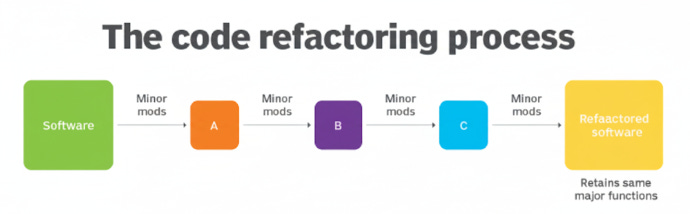
The AI can be engaged with precise prompts to handle specific refactoring tasks. For example, a formal request could be: “Refactor this large, monolithic function into a series of smaller, more modular functions with clear names and single responsibilities.” Similarly, to modernize a codebase, one might prompt: “Convert the following JavaScript code from an older callback-based API to a modern, promise-based or async/await pattern.” This directs the AI to apply contemporary design patterns and language features.
The benefits of AI-powered refactoring are substantial. The AI can quickly simplify convoluted logic, apply consistent naming conventions, and improve the overall structure of the codebase. This automation not only saves significant manual effort but also ensures that the code becomes more readable, easier to test, and more scalable for future development. The result is a more resilient and professional software product.
Learn more about what we discussed by watching this video.
Summary
AI as Your Debugging Partner
AI can serve as a powerful diagnostic tool, significantly streamlining the debugging process.
Developers can provide the AI with error messages or faulty code snippets to get a rapid explanation and solution.
The AI can explain the root cause of an error, turning debugging into a valuable learning opportunity.
This collaborative approach transforms debugging from a tedious, manual task into a more efficient problem-solving session.
Automated Code Review
AI can be leveraged for proactive quality assurance by performing automated code reviews.
By providing specific prompts, the AI can act as an objective peer reviewer, identifying potential issues before they cause problems.
The AI can check for security vulnerabilities, logical errors, and style guide deviations.
This early detection of issues enhances overall code quality and reduces the cost and effort of future bug fixes.
Performance Optimization
A working application is not always an efficient one, and AI helps to identify and resolve performance bottlenecks.
You can prompt the AI to analyze a function or algorithm and suggest a more performant alternative.
The AI can propose better data structures or algorithms to improve execution speed and resource consumption.
This automated optimization leads to a more robust, scalable, and responsive application.
Refactoring for Clean Code
AI is an invaluable tool for refactoring, a process that improves code readability and maintainability without altering functionality.
You can issue specific prompts to refactor monolithic functions into smaller, more modular components.
The AI can also help modernize a codebase by converting outdated patterns to more contemporary ones, such as callbacks to
async/await.This automation reduces technical debt and helps ensure the codebase remains clean and professional over time.
Tips for AI-assisted Code Quality.
Always Provide Full Context - When debugging, paste the complete code snippet and any error messages to give the AI a full understanding of the problem.
Specify Your Quality Metric - When asking for optimization, tell the AI exactly what you want to improve, such as “optimize for speed” or “reduce memory usage.”
Request a Code Audit - Ask the AI to perform a comprehensive code review by using a prompt like “Identify any potential bugs, security issues, or stylistic inconsistencies in this code.”
Refactor in Increments - Instead of asking the AI to refactor an entire codebase at once, provide it with one function or class at a time to ensure clarity and control.
Learn from the AI - When the AI offers a solution, ask it “Why is this solution better?” to learn the underlying best practices and improve your own skills.
Answer of the day
What is the single most effective prompt to get an AI to find and fix a logic bug in a small JavaScript function?
Fix the logic bug in this function.
This direct and specific prompt is highly effective because it immediately tells the AI what to do. By pasting the code snippet directly, you provide the necessary context. The AI can then analyze the logic, identify the error, and provide a corrected version, saving you from a tedious debugging process.
That’s A Wrap!
Want to take a break? You can unsubscribe anytime by click this link at the bottom of your email.